
Custom fields
In the profile of a project you can define your own fields for data entry. There is currently a limit of ten user-defined fields describing plots and plot observations, ten for species and ten for individual plants.
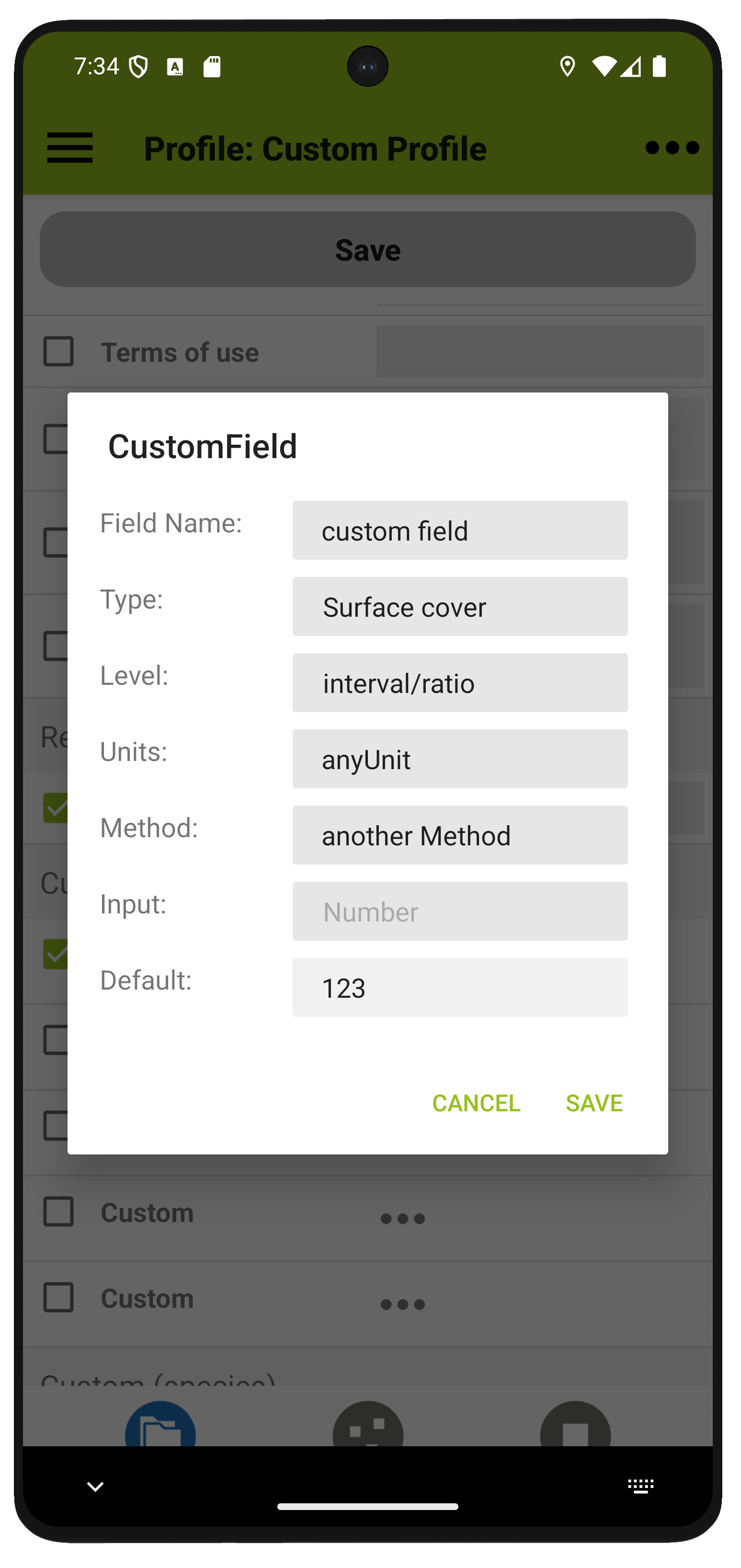
To create a custom field, click on the three dots next to an available field (custom fields are located at the bottom of the profile's variable list). This will open the dialogue shown above. Fill it in and tick the box if you want to use the new variable. The available fields are
| Field Name * | The field name | Type * | A pick list of categories that define where the field appears in the plot data entry. This is only relevant for user-defined fields related to plots and plot observations. It is also used when exporting to Veg-X. | Scale * | Scale level of the new variable (pick list: nominal, ordinal, interval/ratio). Used when exporting to Veg-X. | Units | The unit in which the variable is measured (e.g. m). Only shown with level interval/ratio. Used when exporting to Veg-X. | Categories | Categories used for ordinal or nominal scale variables. The values are entered in the form of a semicolon-delimited list, e.g. good;fair;bad, and then used to provide a pick list for the respective field. | Method | The method used to collect the data. Used when exporting to Veg-X. | Input * | A variable that affects how the keyboard is opened (numbers or letters). This is ignored if categories are provided. | Default | As the name suggests: a default value. |
* required
HOME UP
Privacy Policy, Contact, Impressum