
Menus
Action bar
The action bar can be reached using the icon on the upper left. It provides four links to frequently used functions. If there is any input required the icon turns red and the respective menu point turns yellow:
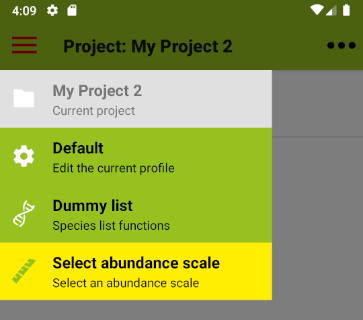
The individual actions:
 |
Projects: If you are not in a project: link to the list of projects; if you are in a project: name of the current project (no action) |
 |
Profiles: If you are not in a project: link to the list of profiles; if you are in a project: link to the active profile |
 |
Species Lists: If no species list is selected: link to species list functions; with a selected species list: name of the list and link to species list functions |
 |
Abundance Scales: If you are not in a project or no scale is selected: link to abundance scale functions; if you are in a project and a scale is selected: name of the active scale. As long as the scale can be changed the button keeps linking to the abundance scale functions |
Menu
The menu is accessible by tapping on the icon with the three dots on the upper right or, with some devices, by using a designated menu button. The menu points in detail:
Projects
Manage
Links to the Start screen with options for Managing projectsImport
Opens a file manager where you can select and load a Vegapp XML file with a projectExport
CSV
A zip archive containing comprehensive, analysis-friendly tables in CSV format that can easily be read in R.XLSX
Can be read by most spreadsheet programs like Excel or Calc. There are separate sheets for species and individuals data.Vegapp
XML used for backup or for lossless project transfers between devices. Filename extension ".veg".Veg-X
Veg-X is an XML exchange standard for vegetation data. Filename extension ".vegx".Turboveg
XML for use in TurboVeg or Juice.KML File
Stores a KML file with plot positions for use with GPS devices and GIS systemsSend
CSV
A zip archive containing comprehensive, analysis-friendly tables in CSV format that can easily be read in R. Choose between email, Bluetooth, WiFi or cloud services, depending on your device.XLSX
Can be read by most spreadsheet programs like Excel or Calc. There are separate sheets for species and individuals data. Choose between email, Bluetooth, WiFi or cloud services, depending on your device.Vegapp
XML used for backup or for lossless project transfers between devices. Filename extension ".veg". Choose between email, Bluetooth, WiFi or cloud services, depending on your device.Veg-X
Veg-X is an XML exchange standard for vegetation data. Filename extension ".vegx". Choose between email, Bluetooth, WiFi or cloud services, depending on your device.Turboveg
XML for use in TurboVeg or Juice. Choose between email, Bluetooth, WiFi or cloud services, depending on your device.KML File
Stores a KML file with plot positions for use with GPS devices and GIS systems. Choose between email, Bluetooth, WiFi or cloud services, depending on your device.Layers
Edit
Active if you are in a project: Edit the layer system of the active projectManage
Links to the list of layer systems with options for managingImport
Opens a file manager where you can select and load an XML file with a layer system exported from VegappExport
Stores a layer system in an XML format for backup and transfer between devices with this app installed (Filename extension ".vegl").Send
Share a layer system as an XML file for backup and transfer between devices with this app installed (Filename extension ".vegl"). Choose between email, Bluetooth, WiFi or cloud services, depending on your deviceProfile
Edit
Active if you are in a project: Edit the profile of the active projectManage
Links to the list of profiles with options for managingImport
Opens a file manager where you can select and load an XML file with a profile exported from VegappExport
Stores a settings profile in an XML format for backup and transfer between devices with this app installed (Filename extension ".vegp").Send
Share a settings profile as an XML file for backup and transfer between devices with this app installed (Filename extension ".vegp"). Choose between email, Bluetooth, WiFi or cloud services, depending on your deviceSpecies
Load from disk
Opens a file manager where you can select and load a species listLoad from web
Displays a list of species lists for download and importDummy list
Restores a default set of speciesCover
Select for project
Active if you are in a project and no species has been added yet: Select a cover-scale for the projectLoad from disk
Load a new set of cover-scales from diskLoad default scales
Reset abundance scales to defaultPhotos
Browse
Open Vegapp's photo browser.Share
Send a zip archive with project photos.Migrate
Move photos to the app's own photo folder that is used by newer Vegapp versions.Help
Opens this web-based help site (if you are connected)About
Details about this app including contacts, privacy policy and terms of useHOME UP
Privacy Policy, Contact, Impressum