
Species entry
List view
To enter, edit or delete species records open the species tab in the plot observations screen. Before entering species you need to select a species list. While it is possible to change the species list of a project on the fly, it is not advisable because it can result in taxonomic inconsistency.
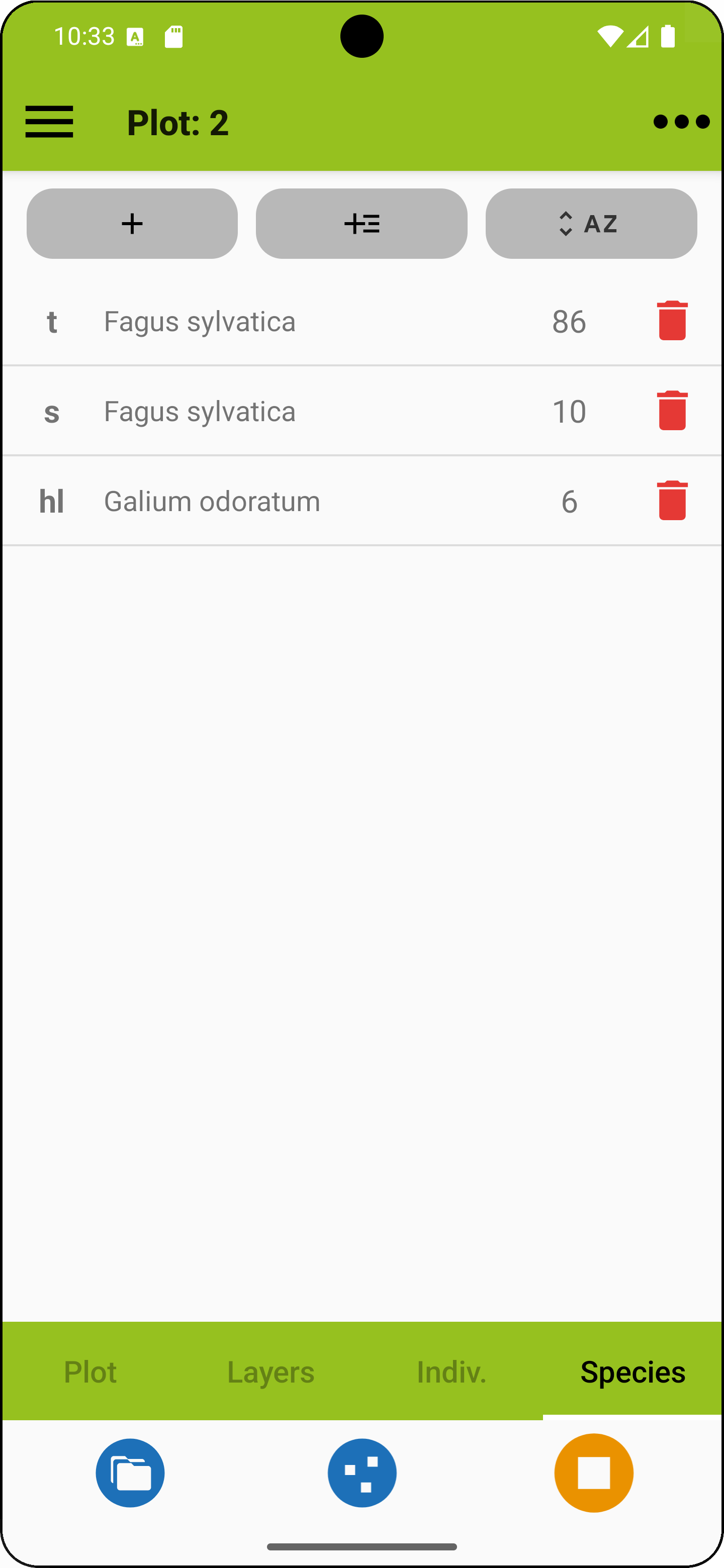
The tab shows a table with the records along with their layer and, if already entered, abundance or cover values. You can sort the list within layers by alphabetical order or by abundance / cover (right button).
The first (plus) button on the top opens the fast species entry. The second plus button opens the attributes view for a new entry. Tap on a species entry to enter the species attributes view.
The fast species entry mode allows entering taxon names along with their layer. You can stay in that dialog and use "save & next" for adding more records quickly. Abundance or cover values can be added later by first long-pressing a taxon name and then quickly looping through the list. With some species lists, nested taxon concepts occurring together in a project (like a subspecies and its species) are flagged with orange dots.
 |
Add a taxon in fast mode. |
 |
Add a taxon using the attributes view. |
 |
Toggle for sorting alphabetically or by cover. |
 |
Delete taxon. |
 |
Indicates nested taxa (availability depends on species list). |
HOME UP
Privacy Policy, Contact, Impressum