
Species entry
Record view
While the species table provides an overview, the record view has more options. It can be reached from the table by tapping on a record or using the second button on top (for a new record).
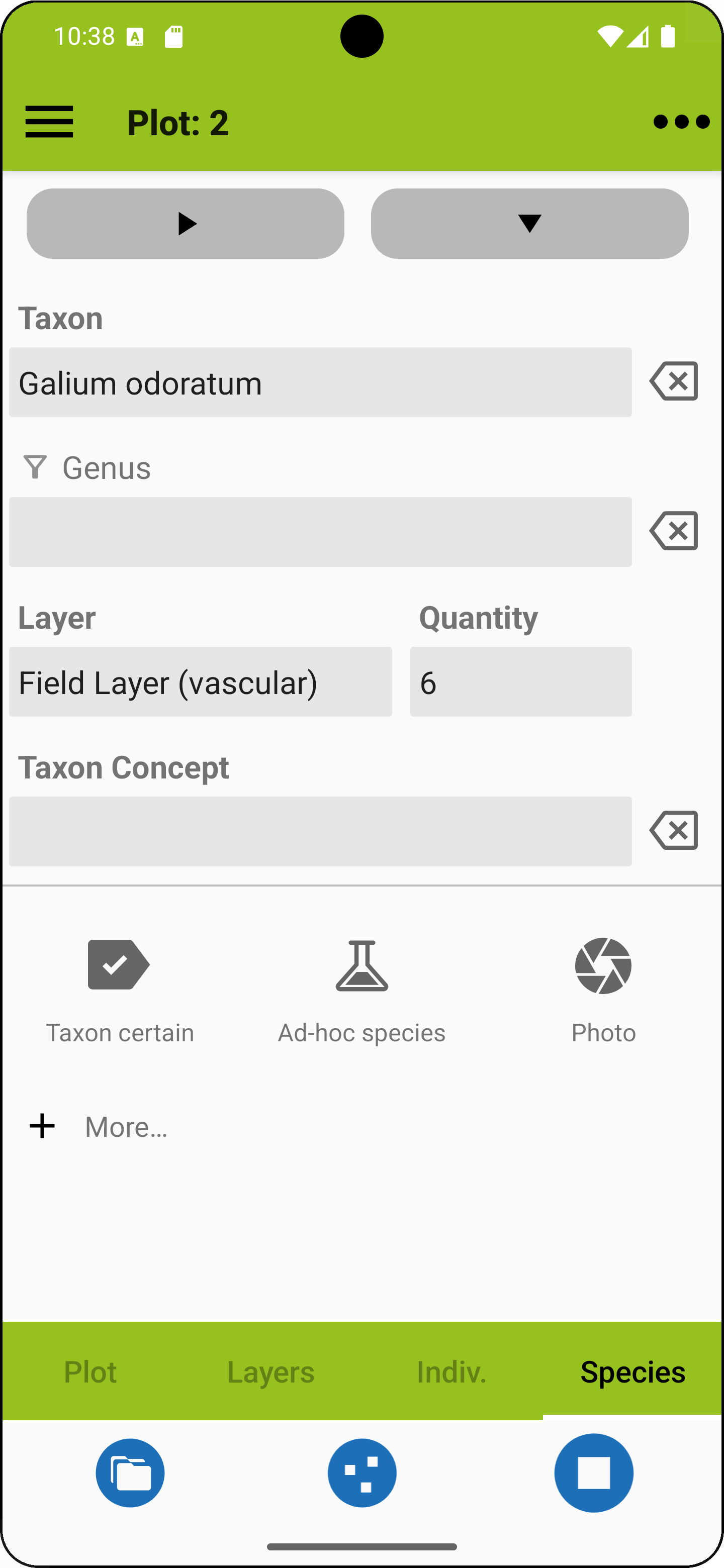
The fields in this view are explained in the table below. When you have finished your entries, you can add another species in the same layer with the right pointing arrow button at the top, or you can continue with the same species in another layer with the down pointing arrow button.
| Taxon | Tap in the field and start to enter genus and species abbreviations to narrow down a selection of taxon names (like p ann for Poa annua). Make sure to enter a valid name or synonym from the active species list. You can also long-press the taxon field and a list of already entered taxon names shows up. If you use the genus filter below the field turns into a species selection field. |
| Genus | If you use this genus filter the taxon field turns into a species selection field. Instead of entering a genus you can long-press the field and a list of already entered genus names shows up. |
| Layer | Pick a layer (stratum). Layers are defined project-wise as layer systems. There is also a no-layer option. |
| Quantity | Pick a quantity. Cover or abundance codes are retrieved from an abundance scale that needs to be defined before values are entered. Once values are entered, the project is tied to a scale. |
| User taxon concept | For example the flora you used. This clarifies what the name actually refers to. The entry is recycled at the next species entry. |
| Custom fields | You can add up to ten custom fields related to species. Please refer to the custom fields section if you want to learn more about this option. |
 |
Add another species in the same layer. |
 |
Add the same species in the next layer. |
 |
Set cf. (uncertain identification) for genus or species. |
 |
Add an ad hoc species (see separate explanation below). |
 |
Capture a photo. Photos can only be added once a taxon name has been entered. |
 |
Browse project photos. |
 |
Toggles for turning on or off: - Confirmation prompts - Synonyms in species selection. |
Ad-hoc species
If a species is missing from your species list (or you have no idea which species it is), you can add an "ad hoc species". It will be accessible across projects and exported with the project. If you want to get rid of accumulated ad-hoc species, you can delete them from the right menu.
Fields for ad-hoc species entries
| Genus* | Latin name of the genus like Cocos in Cocos nucifera |
| Species* | The rest of the name except for the author citation. This field usually takes the latin specific epithet like nucifera in Cocos nucifera but it may also contain intraspecific epithets and connecting terms denoting the rank like "subsp.". Also, terms indicating the width of species concepts like "s.str." or "s.l." and other abbreviations like "agg." go here. |
| Scientific | Checkbox indicating whether this is a scientific name (mainly required for export to VegX) |
* Required
HOME UP
Privacy Policy, Contact, Impressum